
Your card, in 14 places you already are.
A signature on every email you send. A banner on your LinkedIn. A QR on the back of the van, on the counter, on the noticeboard and on the screen during a video call. All generated from the same live profile, all free, and all still correct after you change your number.

Product illustration
Live preview — that QR is real, scan it to open a demo profile. Demonstration details are fictional.
Generated from your live card, at the right size
Sizes are the point. “A poster” is a vague promise; A4 at 300 dpi is something you can send to a printer. Every graphic below comes out ready for where it is going, in whichever of the 3 styles you pick — Branded, Minimal, Bold — and one button downloads the whole lot as a zip.
On a screen
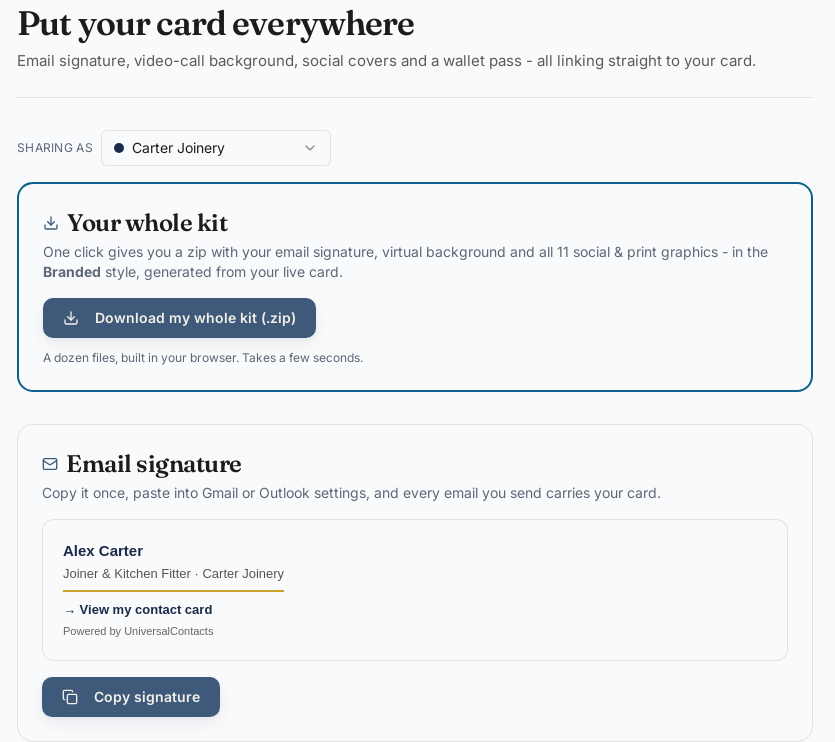
- Email signatureA ready-made block. Paste it once into Gmail, Outlook or Apple Mail and every message you send carries your card.
- Video-call background1920 × 1080, the size Teams, Zoom and Meet all expect, with a QR big enough to scan off a screen.
- Wallet passApple Wallet and Google Wallet, so your card sits where people keep boarding passes and loyalty cards.
On your profiles
- LinkedIn banner1584 × 396Upload it as your LinkedIn profile background photo.
- Facebook cover1640 × 624Upload it as your Facebook page or profile cover.
- X / Twitter header1500 × 500Upload it as your X profile header.
- Instagram post1080 × 1080Post it to your grid or pin it to your profile.
- YouTube channel art2560 × 1440Upload it as your YouTube channel banner.
- Twitch banner1200 × 480Upload it as your Twitch profile banner.
- Story (IG / FB / WhatsApp)1080 × 1920Share it to Instagram or Facebook stories, or WhatsApp status.
On paper, at 300 dpi
- Name badge (A7)874 × 124074 × 105 mm at 300 dpi. Print for a lanyard or conference badge.
- Table tent (A6)1240 × 1748A6, 105 × 148 mm at 300 dpi. Print, fold and stand it on a desk or stall.
- Scan-me sticker945 × 118180 × 100 mm at 300 dpi. Print and stick it on your van, door or laptop.
- A4 poster2480 × 3508A4, 210 × 297 mm at 300 dpi. Print for a wall, window or noticeboard.
Where each one earns its keep
The email signature, for the people you never meet
Most of the people who could hire you will never stand in front of you. They will get an email. A signature block with your name, your business and a link to your live profile turns every message you already send into a card you did not have to hand over. Copy it once into Gmail, Outlook or Apple Mail and it is done.
The video-call background, for the card you cannot hand over
Nobody has solved handing someone a business card on a Teams call, and most people stop trying. The background is 1920 by 1080, which is what Teams, Zoom and Meet all expect, and the QR on it is deliberately large enough to scan off somebody else’s screen. Somebody on the call can point a phone at you and have your details before you have finished the sentence.
The social banners, for the profile people check before they ring
Before a stranger calls a trade they have not used, they look you up. A LinkedIn banner, a Facebook cover or an Instagram post carrying the same code as your card means the profile they find is not a dead end: they can save your number from it without asking you for it. Each one comes out at that platform’s own dimensions, so nothing is cropped through the middle of your name. When LinkedIn’s own QR code is the better choice.
The print assets, for the places a card cannot reach
A card is in one pocket. A sticker on the back of the van is seen by everyone behind you at the lights. A table tent sits on a counter while you are busy with somebody else. A name badge does the introduction at a trade show, and an A4 poster on a noticeboard works while you are not in the room. All four come out at 300 dpi, so an office printer gives you something that does not look like a screenshot.
The wallet pass, for the phone they already have open
Apple Wallet and Google Wallet are where people keep boarding passes and loyalty cards, which means it is where they look when they are standing in front of a counter. Your card sits with them, and it updates itself.
Why any of this beats a folder of files
Because of what happens six months later. The whole kit is generated from your live profile, so when your number changes you change it once. Nothing in the kit is a snapshot of a Tuesday in March that somebody is still emailing out in November. That is the same promise the card makes, applied to every other place you appear.
It is also free, on a free profile, with no card details taken. The Toolkit is not the paid tier and it is not a trial. A physical card adds the tap; it does not unlock the tools.
The same artwork, on something that survives a winter
An A4 poster on an office printer is the right answer for a noticeboard indoors. It is the wrong answer for a gate, a hoarding, a trade stand or anywhere it rains. When you get to that point the artwork does not change, only what it is printed on. A counter stand that holds itself up. A display board light enough to carry. A metal sign made to stay outside, or a roll-up banner that scans from across an aisle.
Every item in a run can carry a different code at no extra cost, so twenty boards is twenty places to be found rather than twenty copies. Printed and posted inside 7–10 working days, same as the cards.
Common questions about the Toolkit
Is the Toolkit free?
Yes, on a free profile, with no card details taken. All 14 assets, all 3 styles, and the zip of the lot.
Does the email signature work in Outlook?
Yes. Copy the generated block and paste it into the Outlook signature editor as rich text. Gmail, Apple Mail and most desktop clients take it the same way.
Will the background work in Teams, Zoom and Meet?
Yes. It is a standard 1920 by 1080 image, which is the size all three expect for a custom background. Download it and upload it in your usual settings.
Are the print files good enough for a real printer?
The four print assets come out at 300 dpi at their stated physical size, which is what a print shop asks for. They are RGB PNGs rather than CMYK PDFs, so an office printer or a copy shop will take them happily; for a commercial press, the printed range is made properly to the printer’s own specification instead.
Do I need a physical card to use the Toolkit?
No. The Toolkit works from a free profile. A card adds the tap, not the tools.
What happens when I change my details?
The signature, the background, the pass and every graphic are generated from your live profile. Update the profile and regenerate. There is nothing to reissue and nothing to reprint.
Can each of my profiles have its own kit?
Yes. A separate profile gets a separate kit, which is how one person runs a trade profile and a personal one without the two ever meeting. More on separate profiles →